The challenge

Small Service Gaps Can Affect the Customer Experience

In busy restaurants and cafés, maintaining consistent customer service across every shift can be challenging. Managers cannot observe every counter interaction, and brief operational distractions may go unnoticed until customers complain or service delays become recurring issues.

Mobile Phone Distractions

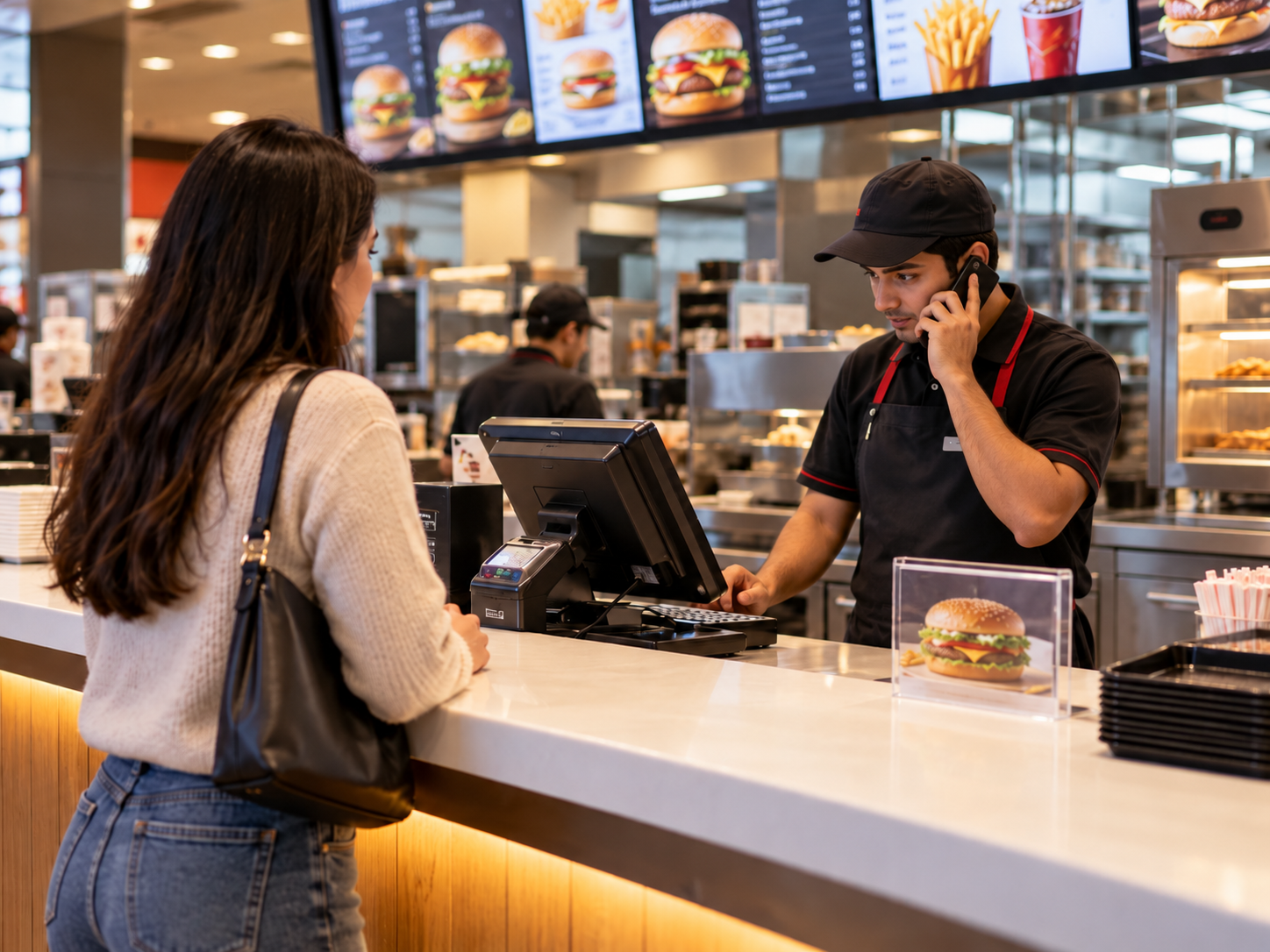
Staff may use personal mobile phones during customer-facing duties, potentially delaying attention to waiting customers.

Customers Waiting for Assistance

A customer may arrive at the counter while a team member is occupied with another activity.

Inconsistent Service Procedures

Customer-facing processes may vary between staff members, shifts and outlets.

Limited Manager Visibility

Supervisors cannot continuously observe every service counter throughout operating hours.

Difficult Event Reviews

Without clear visual records, managers may struggle to understand when and where a reported service issue occurred.

Multi-Outlet Monitoring Challenges

Restaurant chains need consistent oversight of selected service procedures across different locations.

What FlowLinks monitors

Monitor Staff Activities That Affect Restaurant Service

FlowLinks uses AI video analytics to identify supported, observable activities within configured restaurant service areas. Instead of relying on constant manual camera monitoring, operators can establish specific monitoring rules and review flagged events.

Staff Mobile Phone Usage Detection

Identify visible mobile phone usage within designated customer-facing zones when configured monitoring conditions are met.

Customer Presence at the Counter

Detect customer presence within supported service areas to provide context for relevant staff activity events.

Configurable Monitoring Rules

Define eligible camera zones, applicable conditions and event thresholds according to restaurant procedures.

Activity Exception Alerts

Generate alerts for configured, supported service-area activity exceptions so managers can review potential issues.

Screenshot and Video Evidence

Where supported, associate flagged events with timestamps, screenshots and video clips for authorized review.

Multi-Camera Monitoring

Use compatible cameras across selected counters and restaurant locations to help maintain consistent monitoring practices.

How it works

Turn Existing CCTV into AI Staff Activity Monitoring

01

Connect existing cameras

Connect FlowLinks to compatible CCTV or IP cameras covering customer-facing service counters and other approved monitoring areas.

02

Define monitoring rules

Select the service zones, visible activities and conditions to monitor — such as staff mobile phone usage when a customer is present.

03

AI analyses visible activities

FlowLinks processes camera footage to identify supported activity patterns and evaluate them against configured monitoring rules.

04

Review detected events

Authorized managers can review relevant alerts and available visual evidence to understand the event and determine whether follow-up is appropriate.

CCTV Camera→Activity Detection→Rule Evaluation→Alert & Review
LIVECAM-S1Restaurant counter staff serving customer — AI video analytics for staff activity monitoringActivity event flagged — counter 1, sent to manager

Practical application

Detect Staff Mobile Phone Usage While Customers Are Waiting

In a quick-service restaurant, customers expect timely assistance at the counter. During busy shifts, a staff member may be occupied with a mobile phone when a customer arrives. FlowLinks is designed to identify supported phone-use activity within a configured service zone and evaluate whether a customer is also present. When the configured conditions are met, the system can flag the event for authorized management review.

This helps restaurant operators identify potential service interruptions and reinforce consistent customer-facing procedures. Staff activity monitoring is part of the wider AI video analytics for restaurants that FlowLinks provides across front-of-house and kitchen operations.

Example Monitoring Workflow

1

A customer enters the configured service-counter area.

2

The camera identifies a staff member visibly using a mobile phone.

3

The system evaluates the detected activity against configured conditions.

4

A relevant event is flagged for management review.

5

Authorized personnel can assess the visual evidence and context before deciding on follow-up.

Note: Illustrative workflow. Actual detection depends on camera placement, visibility, configuration and supported software capabilities. A phone-use event alone does not establish an employee policy violation.

Discuss Your Monitoring Requirements

Business benefits

Better Service Visibility Across Every Restaurant Shift

Improve Customer Service Oversight

Identify supported activity exceptions that may affect customer-facing service procedures.

Reduce Manual Video Monitoring

Allow managers to focus their attention on relevant flagged events rather than continuously watching live feeds.

Support Consistent Service Standards

Apply defined monitoring rules to selected service areas across different shifts.

Review Service Exceptions

Use relevant event records to understand operational circumstances and identify opportunities for improvement.

Support Staff Coaching

Provide contextual information for fair, constructive feedback where a verified service issue has occurred.

Improve Multi-Location Visibility

Help restaurant chains establish consistent monitoring configurations across selected outlets.

Built for restaurant operations

Staff Activity Monitoring for Restaurants & Cafés

Quick-Service Restaurants

Monitor supported staff activities at busy ordering and service counters.

Cafés & Coffee Shops

Review selected customer-facing activity exceptions in ordering and collection areas.

Fast-Food Chains

Apply consistent monitoring conditions across multiple service counters and outlets.

Food Courts

Monitor approved customer-facing service areas during peak periods.

Multi-Location Restaurant Operators

Give authorized managers better visibility into relevant operational events across distributed locations.

Responsible AI monitoring

Monitor Defined Activities, Not Employee Intent

AI camera analytics should support operational review rather than replace human judgment. FlowLinks monitoring focuses on visible activities and configurable operational conditions. A flagged event should be reviewed in context before any management decision is made.

Defined Monitoring Areas

Monitor designated work areas relevant to established operational procedures.

Human Review

Treat AI-generated events as information for review, not conclusive proof of misconduct.

Privacy-Conscious Configuration

Respect applicable privacy requirements, employee notice obligations and organizational access policies.

Context Matters

Consider customer presence, legitimate work duties, emergencies and approved device use before interpreting a flagged event.

More restaurant solutions

Explore More AI Video Analytics for Restaurants

Frequently Asked Questions

Common questions.

Improve Visibility into
Restaurant Service Operations

Discover how FlowLinks can help identify supported staff activity exceptions, monitor customer-facing service conditions and give your managers better operational visibility using existing cameras.

Book a demo
WhatsApp