Store insights

Understand Retail Dwell Time Across Your Store

See where shoppers spend the most time, which displays or aisles attract attention, and which areas are passed quickly. Retail dwell time analytics helps retailers improve product placement, store layout, and in-store decisions — and sits alongside footfall, queue, and security data within FlowLinks' retail video analytics platform.

The problem

You have a store full of products. Half your aisles are invisible to your customers.

Without dwell data, layout decisions are based on gut feel. You put a promotion in an aisle that nobody walks through, and your best-selling product sits in a dead zone. FlowLinks maps exactly where customers go, how long they stay, and which areas they skip — so every product placement and promotion decision is data-driven.

What FlowLinks measures

See your store through your customers' feet.

Dwell time by zone

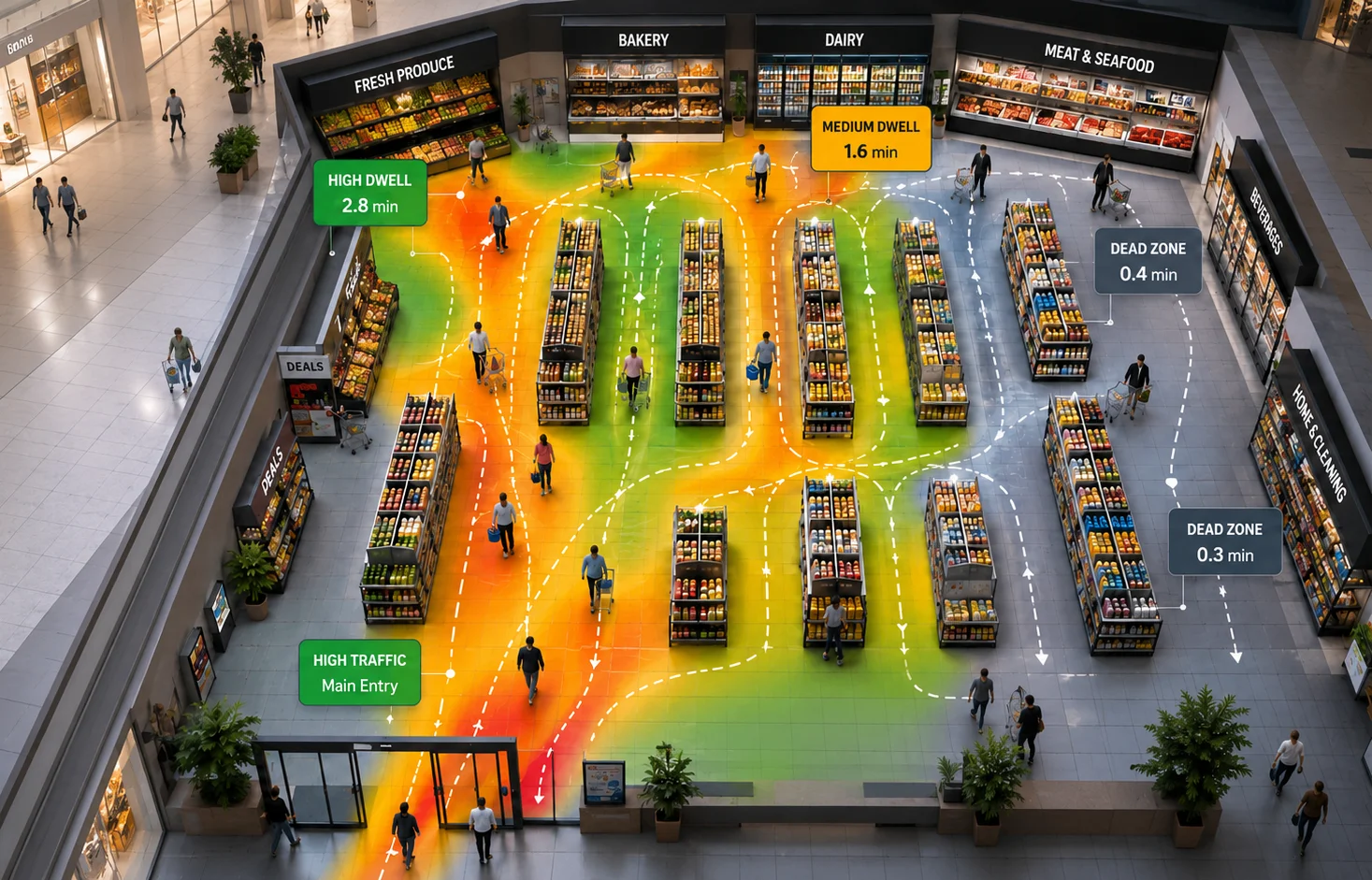
How long shoppers spend in each aisle or product area — higher dwell in a configured zone can indicate greater engagement or time spent with a product.

Dead zone identification

Areas where customers rarely go or pass through quickly — prime candidates for layout changes or promotions.

Customer journey mapping

Track the paths customers take through your store — understand natural flow and where journeys end before the till.

Hotspot detection

The aisles and zones that pull customers in and keep them — use this to place high-margin products strategically.

Promotion effectiveness

Compare dwell time and footfall in a zone before and after a promotion or display change — measure actual impact.

Time-of-day patterns

See how zone popularity changes by hour — morning shoppers vs. evening browsers behave very differently.

Metrics & heat maps

Dwell Time Metrics and Heat Maps

Heat maps provide a visual representation of shopper movement and dwell patterns, while dwell time metrics show how long visitors spend in configured zones. Together, this dwell time analysis helps teams compare store areas, identify zones that may need further review, and make informed layout and placement decisions. FlowLinks retail heatmaps visualise zone-level dwell data, helping teams compare measured dwell patterns across store layouts and product placements. For a deeper look at what longer or shorter dwell can actually mean, read our retail dwell time guide.

How it works

Your floor cameras become a store intelligence layer.

01

Connect to floor & aisle cameras

FlowLinks connects to compatible existing overhead and aisle cameras via RTSP — no new hardware required.

02

AI measures shopper dwell

Video dwell time tracking calculates anonymously how long each person spends in each configured retail zone — no personal identification required.

03

Heatmaps generated automatically

Visual heatmaps show hot zones (longer measured dwell, higher traffic) and dead zones (avoided or passed through quickly).

04

Teams review zone-level analytics

Use zone-level dwell patterns and analytics to place high-margin products in hotspots and run promotions in dead zones.

LIVECAM-FLOORStore zone heatmapAisle 3 hotspot · Aisle 7 dead zone detected

By the numbers

Live
zone dwell data updated continuously on your dashboard
24/7
zone tracking across configured aisles and areas, every hour of trading
Zone
level granularity — see exactly which aisles underperform
from $35
per camera / month, all-in

More retail use cases

Other ways FlowLinks helps your store.

Frequently Asked Questions

Common questions.

Find your dead zones. Fix your layout.
Book a demo.

We'll show FlowLinks mapping your store zones live — on your existing cameras, with real dwell time data.

Book a demo
WhatsApp