Video Surveillance Analytics: A Complete Guide

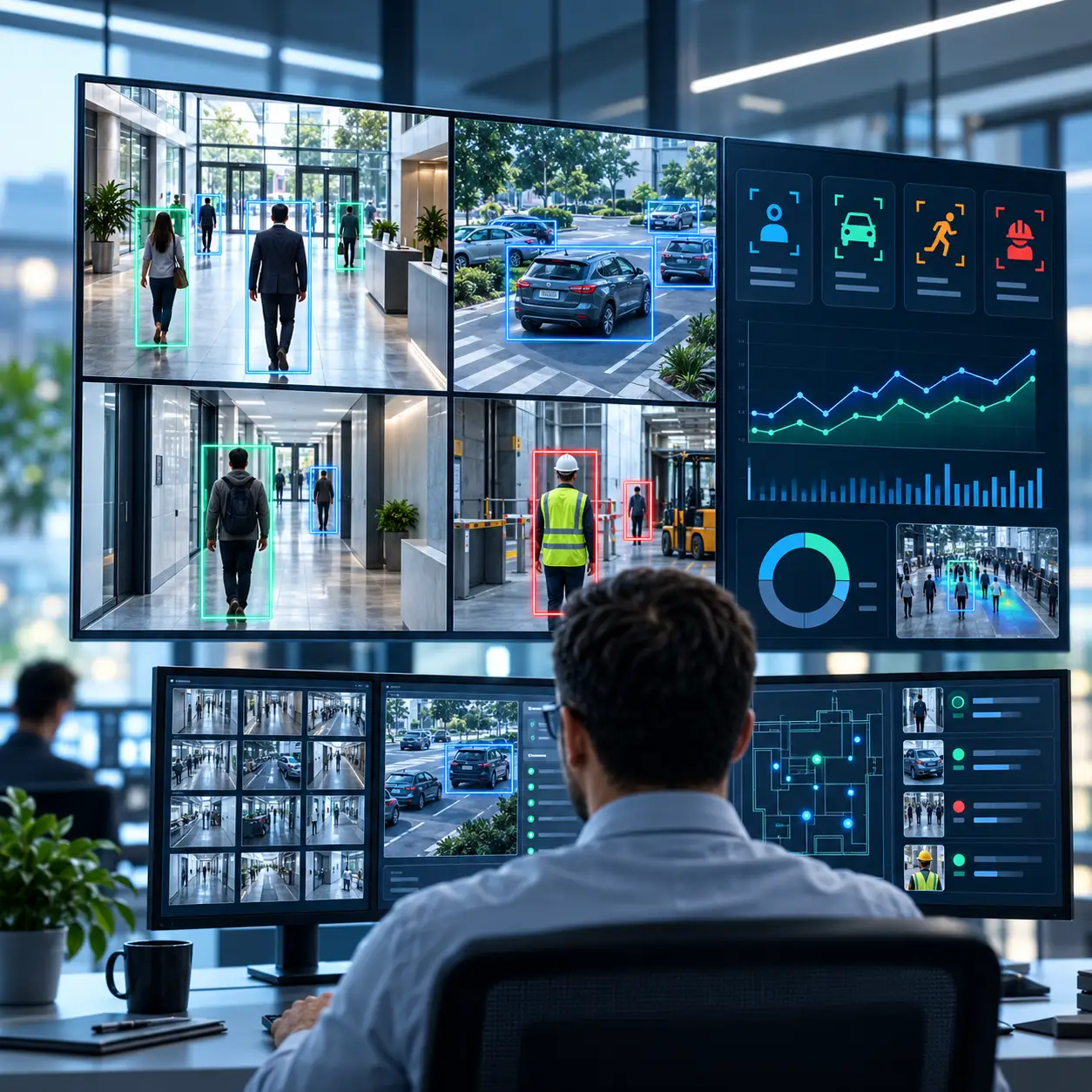
Video surveillance analytics uses AI and computer vision to analyze live or recorded camera footage and detect specific objects, activities, patterns, and events.
Security cameras have traditionally been used to record footage for review after an incident. That remains useful, but it also means someone often has to know what happened, find the right camera, and manually search through recorded video.
Video surveillance analytics changes that approach. Instead of treating every camera as a passive recording device, analytics software can examine live or recorded video for specific objects, behaviors, movements, and events. When something relevant happens, the system can flag it, create an event, or notify the appropriate team.
For organizations already operating CCTV or IP camera networks, this can turn existing camera infrastructure into a more active source of security and operational intelligence.
What Is Video Surveillance Analytics?
Video surveillance analytics is software that analyzes live or recorded security-camera footage to identify predefined objects, activities, patterns, or events. Modern platforms increasingly use artificial intelligence and computer vision rather than relying only on basic motion detection.
If you want the broader conceptual explanation of intelligent video analysis, see FlowLinks' Guide to intelligent video analytics. This article focuses specifically on how analytics fits into surveillance systems and real-world camera operations.
Depending on the system and use case, analytics may identify:
· People and vehicles
· Movement within defined zones
· Queue buildup and waiting conditions
· Restricted-area entry
· Loitering or unusual activity
· Missing personal protective equipment
· Falls or safety-related events
· Vehicle number plates
· Crowd or occupancy conditions
· Objects left in monitored areas
The objective is not simply to record more video. It is to help teams understand what is happening across a camera network and surface events that may require attention.
How Video Surveillance Analytics Works
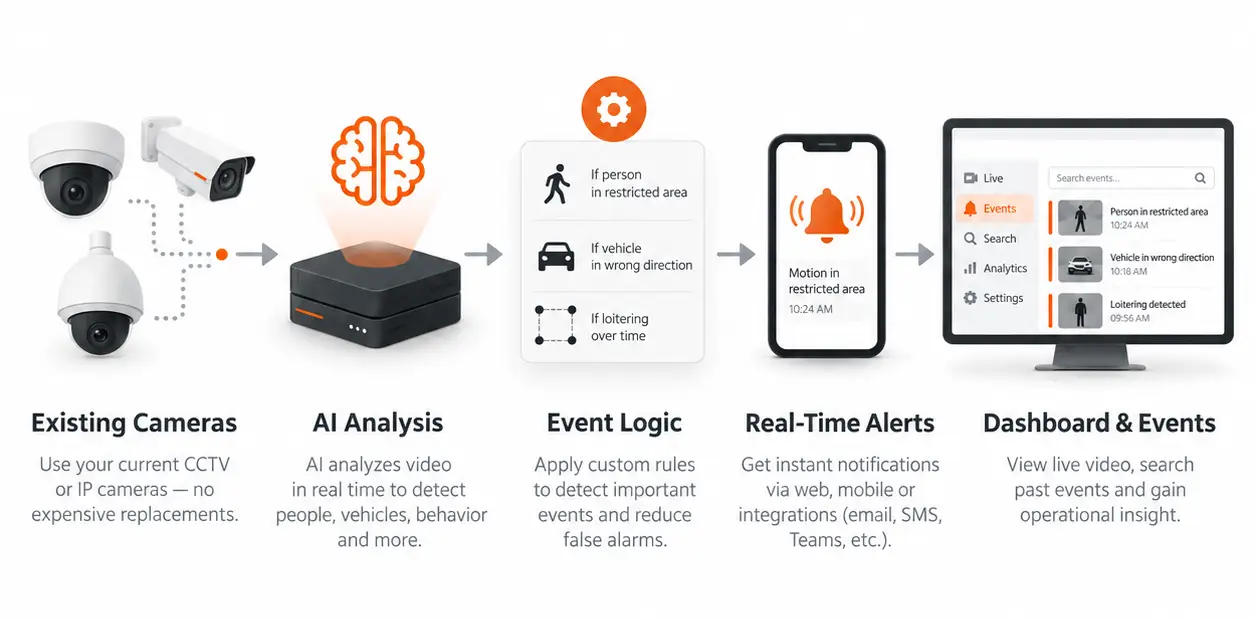
A surveillance analytics system typically sits between the camera feed and the people or systems responsible for responding. The exact architecture varies, but the workflow is usually similar.
1. Camera or NVR footage is ingested
The platform receives video from CCTV or IP cameras, RTSP streams, an NVR, or a video management system. Depending on the deployment, footage may be processed continuously or sampled at a defined frame rate.
2. AI analyzes frames and objects
Computer vision models examine the video and identify relevant objects or activity. A system may detect a person, vehicle, safety helmet, queue, restricted zone, package, or other configured object.
3. Tracking and rules add context
Detecting a person is not automatically an incident. Analytics becomes operationally useful when detection is combined with tracking, zones, time thresholds, schedules, and site-specific rules.
· A person enters a restricted zone
· A queue exceeds a defined length or wait-time threshold
· A worker enters a production area without required PPE
· A customer remains in a zone longer than a configured dwell threshold
· A vehicle enters through a monitored gate
· A table remains uncleared beyond the service target
4. An alert or event is generated
When the configured condition is met, the system can create an event and route it to a dashboard, mobile application, email, messaging workflow, or another connected system. The goal is to help teams respond without continuously watching every camera feed.
Traditional Video Surveillance vs. Video Surveillance Analytics
Traditional CCTV primarily captures and stores footage. Analytics adds an interpretation layer that can identify conditions while they are happening.
For example, a conventional camera may record a growing checkout queue. An analytics-enabled system can detect that the queue has exceeded a configured threshold and notify staff while customers are still waiting. The camera may remain the same; the intelligence comes from the software analyzing the video.
Where Analytics Fits Into the Surveillance Stack
Video analytics does not have to replace a camera system. In many deployments, it is an additional software layer that works with the equipment already installed.
Cameras
Existing CCTV and IP cameras remain the source of video. Suitability depends on the use case, image quality, lens, angle, lighting, resolution, distance, and whether the subject is visible long enough for the required analysis.
NVR or VMS
A network video recorder or video management system may continue to handle recording and playback. Analytics can consume live streams directly from cameras or through the existing surveillance infrastructure, depending on compatibility and network design.
AI processing layer
The AI layer performs detection, tracking, event logic, and alert generation. Processing may happen at the edge, on an on-site server, in a central data center, in the cloud, or through a hybrid design.
Operations layer
Dashboards, alerts, event logs, integrations, and reports turn raw detections into workflows that security, safety, and operations teams can actually use.
What Can Video Surveillance Analytics Detect?
People, occupancy, and movement
Analytics can count people, track movement through zones, estimate occupancy, and identify how spaces are used. In retail, this can extend into dwell time analytics and heat maps for understanding which areas attract attention and which are passed quickly.
Intrusion and restricted areas
Organizations can define monitored zones and create events when a person or vehicle enters an area that should be controlled. This is useful around perimeters, warehouses, machine zones, staff-only areas, and other restricted spaces.
Queue and wait-time monitoring
Analytics can measure queue length, wait time, and abandonment conditions around service points. Restaurants and service environments can use real-time queue monitoring to alert teams when configured service thresholds are exceeded.
PPE and workplace safety
In industrial environments, video analytics can monitor configured protective equipment and safety conditions. FlowLinks' AI PPE Detection for Manufacturing is one example of using existing CCTV to monitor required helmets, vests, gloves, and other configured PPE.
Vehicle and number plate monitoring
Vehicle analytics can detect and classify vehicles at gates and yards. When combined with automatic number plate recognition, it can create searchable entry and exit records. See FlowLinks' ANPR and Number Plate Tracking use case for warehouse gates.
Falls and safety events
Depending on the environment and camera view, analytics can be configured to identify falls, hazards, or other safety-related events that may require faster review and response.
Video Surveillance Analytics by Industry
The underlying technology is similar across industries, but the operational rules and event types are different. FlowLinks applies the same AI layer to different environments and tunes the detections to the job.
Retail
Retail teams can use AI video analytics for retail for loss prevention, footfall, queues, dwell time, customer assistance, till activity, and store operations.
Manufacturing
Manufacturing facilities can use AI video surveillance for manufacturing facilities to monitor PPE compliance, hazards, restricted areas, quality events, and production activity.
Warehouses and logistics
Warehouse teams can use AI video analytics for warehouses for forklift safety, restricted zones, loading and unloading activity, vehicle movement, ANPR, and after-hours monitoring.
Education
Schools and universities can use AI video analytics for education for attendance, campus access, exam monitoring, footfall, and transport-related visibility.
Restaurants and cafes
Restaurant operators can use AI video analytics for restaurants and cafes for hygiene and SOP monitoring, queue alerts, table turnover, till activity, and day-to-day operational visibility.
For a broader view, see FlowLinks' AI video analytics solutions by industry and its AI video analytics use cases.
Does Video Surveillance Analytics Require New Cameras?
Not always. Many analytics platforms can work with existing IP cameras, CCTV systems, RTSP streams, or NVR infrastructure.
Whether an existing camera is suitable depends on the specific task. Important factors include:
· Resolution and usable pixels on the target
· Camera angle and mounting height
· Lens size and field of view
· Distance from the subject
· Lighting and low-light performance
· Frame rate and motion blur
· Compression and stream quality
· Occlusion and crowding
A camera may be perfectly adequate for detecting whether a person entered a large restricted zone but unsuitable for recognizing a face or reading a number plate at the same distance. At FlowLinks, the practical approach is to assess the existing camera view first and determine what the current infrastructure can reliably support before recommending additional hardware.
Edge, On-Premise, Cloud, and Hybrid Processing
Where the analytics runs affects latency, bandwidth, privacy, resilience, and the number of cameras a deployment can support.
Edge processing
Processing occurs close to the camera or at the site. This can reduce upstream video traffic and keep more footage within the local environment.
On-premise processing
A local GPU server can process multiple camera feeds and centralize analytics without sending all footage to the cloud. This is useful where local control, predictable performance, or network constraints matter.
Cloud processing
Cloud processing can simplify centralized access and multi-site management, but bandwidth, latency, data handling, and retention requirements need to be considered.
Hybrid architecture
Large deployments often split responsibilities: video may be decoded and analyzed locally while alerts, metadata, dashboards, and selected clips are centralized.
Scaling Video Surveillance Analytics Across Many Cameras
A design that works for five cameras is not automatically the right design for fifty or five hundred. As camera counts increase, the system has to account for video decoding, inference capacity, network bandwidth, storage, alert volume, and the different frame-rate requirements of each use case.
Good scaling is not about running the maximum possible model on every frame. It is about matching processing to the operational requirement. Some events need frequent analysis, while others can run effectively on sampled frames or event-triggered workflows.
What to Look for in a Video Surveillance Analytics Platform
Before choosing a platform, organizations should evaluate more than the number of AI features listed on a website.
Existing camera compatibility: Can the platform work with the CCTV, IP cameras, RTSP streams, NVRs, or VMS infrastructure already installed?
Deployment flexibility: Can it run at the edge, on-premise, in the cloud, or in a hybrid architecture?
Use-case fit: Has the detection been tested for the actual camera angle, lighting, distance, crowding, and environment involved?
Real-time alerts: Can events reach the people who need to act, with the right clip or evidence?
Scalability: Can the platform grow from a pilot to larger multi-site deployments without redesigning everything?
Operational context: Can zones, schedules, time thresholds, and workflows be configured around the site rather than using one generic rule?
Privacy and security: Where is video processed and stored, who can access it, and how long is data retained?
Limitations of Video Surveillance Analytics
AI video analytics is not perfect. Performance can be affected by poor lighting, occlusion, crowded scenes, low-resolution footage, motion blur, poor camera positioning, excessive distance, incorrect thresholds, and environmental changes.
There can also be false alerts or missed events. For that reason, analytics should assist security and operations teams rather than be treated as an infallible decision-maker. Camera assessment, configuration, testing, and ongoing tuning remain important.
Where FlowLinks Fits
FlowLinks is the AI layer for organizations that want more from the cameras they already own. It connects existing camera feeds to AI detections, event logic, real-time alerts, searchable evidence, and operational dashboards.
The role of FlowLinks is not to replace surveillance infrastructure unnecessarily. The first step is to understand the camera network, the use case, and the action that should happen when an event is detected. From there, the system can be deployed at the edge, on-premise, centrally, or in a hybrid architecture based on the site's requirements.
See how FlowLinks works for the platform workflow from existing camera connection through AI analysis and alerts.
Conclusion
Video surveillance analytics turns camera footage from a passive archive into a source of actionable information. AI can help identify people, vehicles, queues, restricted-area events, safety conditions, dwell patterns, and other configured activity across a camera network. The technology is most effective when the use case, camera position, processing architecture, and alert logic are designed together. For organizations that already have CCTV infrastructure, the first question may not be "Which new cameras should we buy?" It may be: "What more can we learn from the cameras we already have?"
See What Your Existing Cameras Can Do
Turn existing CCTV cameras into real-time security and operational intelligence with FlowLinks.
See How FlowLinks Works